Jamzone - Sing & Play Along
- 4.7
- Rating
- 100.00K
- Installs
- Free
- Price

 Analysis by App-foxy
I found Jamzone - Sing & Play Along most useful when I treated it less like a passive music player and more like a compact practice partner. It sits in the Music & Audio category, and its focus is clear: backing tracks, chords, and lyrics in one place. That combination makes it appealing to singers, guitarists, small rehearsal groups, and anyone who wants to play along without building a complete arrangement from scratch.
My overall impression is positive, but with an important qualification. This is not the best choice for someone who only wants to stream finished songs, and it is not a replacement for a full recording workstation. Its value appears when I want to take an existing song idea, follow the words and chords, and perform over a prepared musical foundation. For that purpose, it feels more practical than a standard music app and less intimidating than professional music software.
Recisio, the developer behind the app, has made the experience approachable enough for casual sessions while still giving musicians a reason to return. The app is free to install and suitable for Everyone, although optional in-app purchases range from $9.99 to $19.99 per item. That pricing detail matters because the free starting point is easy to try, but regular users should think about how much of the available material they expect to use before committing to purchases.
You May Also Like

 AccuWeather: Weather Radar
AccuWeather Review: A Quick, Clear Forecast for Everyday Decisions
For everyday plans, the best forecast is the one you can understand quickly. AccuWeather makes rain timing, radar, and local conditions easy to act on, with a few trade-offs.

 Hill Climb Racing
Why Hill Climb Racing Still Turns Crashes Into One More Run
A tiny car, a bumpy hill and one more upgrade: Hill Climb Racing keeps resurfacing because its simple chaos makes every near-miss feel personal.

 AliExpress - Shopping App
AliExpress Makes Global Shopping Feel Personal, but Shoppers Bear the Risk
AliExpress turns a global marketplace into a pocket-sized discovery engine. Its reach is useful, its shopping loop compelling, and its trade-offs easy to miss.

 Lords Mobile: Kingdom Wars
Lords Mobile Is a Kingdom-Building Routine, Not a Quick Match
A case-by-case verdict on the building, battles, device demands, and social commitments that make Lords Mobile rewarding for some players and exhausting for others.

 PDF Scanner app - TapScanner
TapScanner Makes Paperwork Easier to Capture, Check, and Share
TapScanner makes scanning with a phone feel less like a rescue operation and more like a dependable step in getting work done. Its capture tools are useful, though not flawless.

 Block Blast!
 Shows How Much a Puzzle Game Can Leave Out
A quiet grid game shows why puzzle players increasingly value instant clarity, repeatable skill and low-pressure play—and where the genre still needs to catch up.
More From Our News Desk
View All News


How Jamzone works when I actually use it
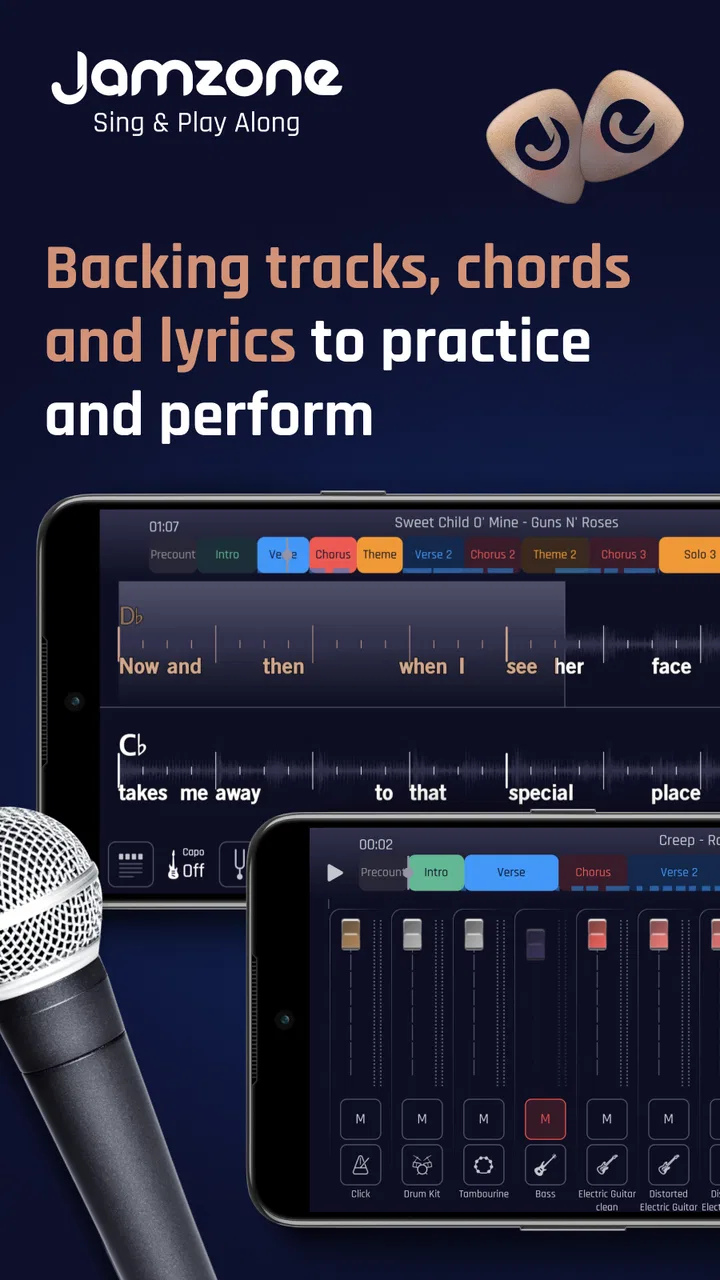
The basic appeal is the relationship between the music, the lyrics, and the chords. Instead of switching between a backing-track source, a lyric page, and a separate chord reference, I can keep the core information together. That reduces the small interruptions that often ruin a practice session: losing my place, checking the next chord, or trying to remember which section comes after the chorus.
I found this especially helpful when rehearsing a song that I know by ear but have not performed recently. Familiarity can be misleading; I may remember the melody while forgetting a verse, a transition, or the exact chord movement. Having the words and harmonic information visible gives me something reliable to follow. It also lets me concentrate on timing and delivery rather than spending the whole session reconstructing the song.
The app’s strongest idea is therefore not simply that it contains music. It is that it connects several parts of a performance workflow. A singer can use the backing track to work on phrasing, while a guitarist can use the chord display as a guide. Someone preparing for an informal performance can move from listening to active participation without changing apps.
That makes it a particularly good fit for short, repeatable practice sessions. I can imagine opening it before work for one song, using it during a lunch break to review a difficult section, or running through several songs before meeting friends. The setup is lighter than opening a computer-based music environment, and the purpose is clearer than browsing an ordinary streaming catalog.
A useful workflow for singers and players
My preferred way to use Jamzone is to begin with a complete pass rather than immediately stopping at every mistake. I listen and perform through the song once, paying attention to where I lose confidence. On the second pass, I focus on one problem area: perhaps an early entrance, a verse lyric, or a chord change that feels late. The combination of track, lyrics, and chords makes that second attempt more focused.
A less obvious benefit is that the app can expose whether a mistake is musical or merely a memory problem. If I know the words but enter at the wrong time, the backing track reveals the timing issue. If I follow the rhythm but hesitate at a chord, the chord information identifies the technical gap. That distinction helps me practice intelligently instead of repeating the entire song without understanding what went wrong.
For guitarists, I would not use the displayed chords as an excuse to stop listening. Chord labels are useful as a safety net, but the backing track remains the better guide for feel and timing. I get the best results when I glance at the upcoming harmony before a section, then return my attention to the groove. Constantly staring at the screen can make a performance stiff, particularly when I am trying to develop a natural vocal delivery.
Singers can use a similar approach with lyrics. Rather than reading every line continuously, I find it more effective to look ahead at the next phrase and then lift my eyes or attention away from the device. That turns the screen into a prompt instead of a crutch. It is a small change, but it makes the session feel more like performing and less like reading.
Where it beats ordinary alternatives
A normal streaming service is better when I want a huge listening library, effortless discovery, or finished recordings. It is designed for consumption, not necessarily for rehearsal. Jamzone makes more sense when I want to take an active role in the song. The difference is similar to watching a performance versus stepping onto the stage with a dependable musical bed underneath me.
Video platforms can be useful for finding tutorials, lyric videos, and play-along material, but they often require more searching and more judgment. I may find several versions of the same song with different arrangements, unclear chord accuracy, or distracting video elements. A dedicated play-along environment is more focused because the intended activity is already obvious.
Professional digital audio workstations offer deeper control, but that depth comes with setup time. Building a backing track, importing stems, arranging sections, and preparing a lyric reference can be rewarding for experienced producers, yet it is excessive for a quick rehearsal. Jamzone occupies a useful middle ground: more active than a player, less demanding than production software.
That middle ground is also its limitation. Users who want to edit every instrument, reshape an arrangement, record elaborate vocal layers, or mix a finished release will quickly need something more powerful. I would not choose it as the center of a serious studio workflow. I would choose it as the tool I open before that workflow, when I am learning, warming up, or testing whether an arrangement suits my voice.
The main weakness is the purchase decision
The free entry point lowers the risk of trying the app, but the presence of optional purchases means the long-term experience deserves a little planning. A person who only needs occasional practice may be perfectly happy starting free. Someone who wants a broad, dependable repertoire should consider the cost of expanding access before building a routine around the app.
I also think the app’s usefulness depends heavily on personal expectations. If I expect every song to match the exact arrangement I already know, a backing-track format may feel restrictive. A prepared accompaniment can provide consistency, but it may not reproduce the live version, the original recording’s small timing details, or the arrangement I would create myself. That is not necessarily a defect; it is the trade-off for convenience.
Another point of friction is screen dependence. The lyrics and chords are central to the experience, so a user who dislikes performing with a phone or tablet nearby may find the format distracting. I prefer placing the device where I can glance at it without turning my whole head. For a social performance, that placement can take a little thought, especially if I am also handling an instrument or microphone.
Beginners should also avoid assuming that visible chords automatically teach technique. The app can show me what to play, but it cannot replace slow practice, clean transitions, breath control, or a sense of rhythm. I still need to simplify a difficult chord, reduce the tempo in my own practice, or isolate a vocal phrase when the song is beyond my current ability.
A realistic everyday session
Imagine I have agreed to sing two songs at a small gathering but have not performed them for months. I could spend the evening searching for separate lyric pages and instrumental versions, or I could use Jamzone as a single rehearsal point. I would first perform both songs without stopping, mark the sections where I hesitate, and then repeat only those sections until the entrances feel predictable.
For the first song, I might use the lyrics to recover a forgotten verse while listening for the backing track’s cue. For the second, I might focus on the chord changes and discover that my problem is not memory but an awkward transition on guitar. After that, I could perform both songs again without watching the screen constantly. This workflow turns a vague practice task into three clear stages: diagnose, isolate, and perform.
The same method works for a casual band rehearsal. One player can use the chords as a shared reference while another concentrates on the vocal line. It will not replace a group’s own arrangement decisions, but it can provide a stable starting point when everyone is still learning the structure. That is where I see the app saving the most time: not by doing all the musical work, but by removing avoidable preparation.
Who should use it, and who should skip it
I would recommend Jamzone to singers who want more structure than karaoke, guitarists who need chord support while playing, and hobby musicians who regularly rehearse songs without a full band. It is also a sensible option for people returning to music after a long break. The app gives them a way to participate immediately, without requiring a large collection of equipment or advanced production knowledge.
It could be particularly useful for a solo performer building confidence. Practicing with silence can make timing feel abstract, while singing over a backing track reveals whether I am rushing, dragging, or leaving awkward gaps. The musical context makes practice more honest. I can hear whether my voice fits the arrangement instead of judging every phrase in isolation.
I would be more cautious recommending it to a producer, composer, or musician who wants complete creative control. If your priority is changing instrumentation, editing individual parts, designing effects, or exporting a polished master, a dedicated production application is the better investment. Likewise, listeners who simply want albums and playlists will probably find a conventional streaming service more natural.
The app is also not ideal for someone who refuses optional spending on principle. Although the starting price is free, the in-app purchase range means the experience may become more expensive for users who want to expand their material. I would begin with the free experience, test the interface with my actual practice habits, and only then decide whether the additional purchases justify themselves.
What the current release tells me
The app was released on June 6, 2018, and the current version is 3.6.4. It supports devices running Android 8.0 or later, which is worth checking before installation if I am using an older phone or tablet. The platform requirements are not the most exciting part of a music app, but compatibility matters when the device is meant to be used during rehearsal rather than casually browsed.
Its audience appears healthy enough to inspire confidence: Jamzone has passed 100K installs, carries a 4.7 average from around 2.2K ratings, and has 477 reviews. I would not treat those numbers as proof that it will suit every musician, but they do suggest that the concept is resonating with a meaningful group of users. The Everyone age classification also makes it approachable for households and mixed-age practice settings.
What matters more to me than popularity is whether the app fits a repeatable habit. A music tool can have a polished first impression and still be useless if it takes too long to prepare. Jamzone earns its place when I use it repeatedly for the same practical jobs: learning a song’s structure, checking lyrics, rehearsing entrances, and playing through an arrangement with less setup.
I would still keep expectations realistic about the role it plays. It is a rehearsal companion, not a teacher that observes my hands or voice and corrects every mistake. Its guidance comes from the musical material itself. That is enough to make practice more organized, but the user remains responsible for listening carefully and deciding what to improve.
My final recommendation
Jamzone - Sing & Play Along succeeds because it addresses a very specific annoyance: the distance between wanting to perform a song and having all the supporting material ready. By bringing backing tracks, chords, and lyrics into one music-focused experience, it makes informal rehearsal quicker and more coherent. I found its greatest strength in that practical connection rather than in any single isolated feature.
The trade-off is that convenience comes with boundaries. Prepared accompaniment is not the same as unlimited arrangement control, on-screen lyrics can become a distraction, and optional purchases deserve consideration for anyone planning regular use. Those are meaningful limitations, but they do not undermine the central idea.
If I were recommending it to a friend, I would say this: try it if you want to sing or play along with more structure, especially when you practice alone. Start with a real song you need to learn, not a random test, and see whether the combined track, lyric, and chord workflow improves your session. If your goal is listening, advanced production, or total musical control, choose a different kind of app.
For the right user, Jamzone is a practical bridge between passive listening and active performance. It will not replace musicianship, but it can make the next rehearsal easier to start, easier to organize, and more revealing once I begin playing.
FAQs for Jamzone - Sing & Play Along
01What is Jamzone - Sing & Play Along?
Jamzone is a music practice and performance app that lets you sing or play along with professionally arranged backing tracks. Songs are separated into individual instrument and vocal stems, so you can adjust the volume of guitars, drums, bass, vocals, and other parts. It is designed for karaoke singers, musicians, bands, and anyone who wants a more interactive alternative to ordinary lyric videos.
02Can I use Jamzone without an internet connection?
Jamzone generally requires an internet connection to browse the catalog, stream content, synchronize your account, and access certain features. However, supported songs or packs may be downloaded for offline use after they have been obtained through the app. It is best to download tracks while connected to Wi-Fi and confirm that they appear in your library before relying on offline playback during travel or a live performance.
03Is Jamzone - Sing & Play Along free to download?
The app can usually be downloaded at no initial cost, but access to its complete song catalog and advanced content may involve in-app purchases, subscriptions, or separately purchased song packs. Free availability can vary by platform, region, and promotion. Before confirming a purchase, check the current pricing, renewal terms, and exactly what is included, because downloading the app does not necessarily unlock every track.
04What devices and equipment work with Jamzone?
Jamzone is intended for compatible Android and iOS phones or tablets, although the exact operating-system requirements may change with future updates. You can normally use the device’s built-in speakers, wired headphones, or Bluetooth audio equipment. Musicians may also connect microphones, instruments, mixers, or external speakers, but compatibility and latency depend on the device, adapters, audio interface, and settings used.
05Who is Jamzone best suited for, and is it easy for beginners?
Jamzone is useful for beginners learning songs, singers practicing harmonies, instrumentalists rehearsing with a virtual band, and experienced performers preparing live sets. Its stem controls make it possible to lower or mute selected parts, which is especially helpful when practicing a specific instrument. Beginners may need some time to understand the interface, song purchases, audio routing, and performance controls, but the basic play-along concept is approachable.
Pros
- Large catalog of karaoke tracks across many popular genres.
- Instrumental parts can be muted to let you sing or play along.
- Useful chord and lyric displays for practicing musicians.
- Audio and video quality are generally clear on supported devices.
- Progressive song difficulty suits both beginners and experienced players.
Cons
- Many of the best songs require separate purchases or a subscription.
- Some tracks may be unavailable depending on your region.
- Accurate vocal and instrument results depend on a stable connection.
- The interface can feel crowded when lyrics
- chords
- and controls are shown.
- Advanced features may take time to learn without prior music-app experience.

Jamzone - Sing & Play Along
Gallery